


It does, in fact come off with very little effort. At least the old stuff (with the solvent that smells like pure acetone) does. I haven't used rubber cement on glass for a very long time - I'm lazy and the Avery stick-ons work just fine for me! ;DRubber cement? Will that ever come off again? Or does it politely peel off the glass?
What's your prefered method for labels?
- Thread starter Allen Brown
- Start date
-
Love Gotmead and want to see it grow? Then consider supporting the site and becoming a Patron! If you're logged in, click on your username to the right of the menu to see how as little as $30/year can get you access to the patron areas and the patron Facebook group and to support Gotmead!
-
We now have a Patron-exclusive Facebook group! Patrons my join at The Gotmead Patron Group. You MUST answer the questions, providing your Patron membership, when you request to join so I can verify your Patron membership. If the questions aren't answered, the request will be turned down.
You are using an out of date browser. It may not display this or other websites correctly.
You should upgrade or use an alternative browser.
You should upgrade or use an alternative browser.


I use Adobe Photoshop Elements. Nice little program, though MS Publisher works as well. Specifically, I make the image in PSE, then import it to publisher for the template, then shuffle off to the print shop to use the uber high quality printer.
That's for stuff that goes out the door. For stuff that stays home I use duct tape.
I buy the labels from 4th & Vine - http://www.4th-vine.com/
That's for stuff that goes out the door. For stuff that stays home I use duct tape.
I buy the labels from 4th & Vine - http://www.4th-vine.com/

I got pretty, easy-to-remove labels from my brewstore for my mom's wedding wine but they were a bitch to work with, they didn't have an Avery equivalent so I pretty much had to guess at its margins through trial and error with a Word table...

I got pretty, easy-to-remove labels from my brewstore for my mom's wedding wine but they were a bitch to work with, they didn't have an Avery equivalent so I pretty much had to guess at its margins through trial and error with a Word table...
Use a ruler and publisher in this case...
Or you can set up a custom label sheet in Word if that's what you're familiar with. Entering ruler info works quite well.

Right now I use two rolls of Masking Tape. One 1 inch and one 2 inch. I stack them on their sides and slide the bottle in the middle of the roll's cardboard tube.
With the masking Tape roll, I can stick the bottle in the center and turn it if I did a back label. I think the hardest part of a front and back label would be the spacing between the two. I plan on heading to the hardware store and replacing the Tape roll with some PVC Piping. Then I can mark the plastic white pipe with lines to indicate where to place the front and back labels.
I used the Avery white shipping labels for Inkjet Printers 3 1/2 x 5 - 8168, and the Avery Label Design Pro software. If you use that, the 8168 template's not in it's list, you have to use the laser Jet template of the same size which is 5168.
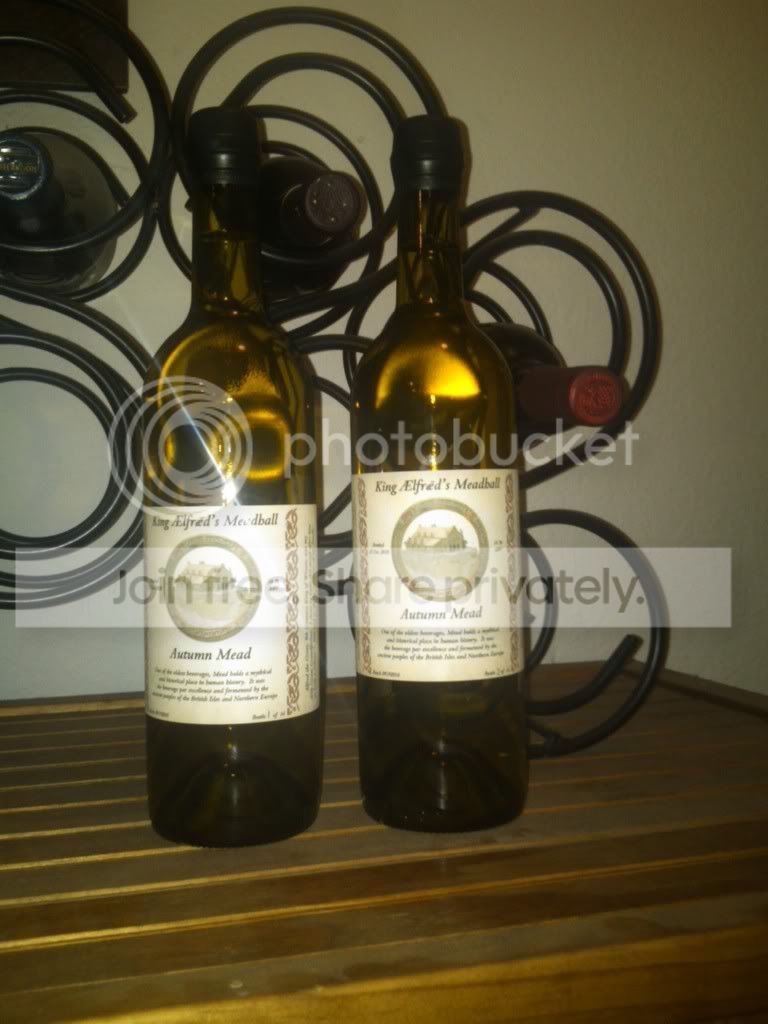
Below is a photo of my bottles with my label. The bottle on the left was the first bottle I did, and I thought it was too low. So I changed to the two different sizes of tape.
Happy Meading.
With the masking Tape roll, I can stick the bottle in the center and turn it if I did a back label. I think the hardest part of a front and back label would be the spacing between the two. I plan on heading to the hardware store and replacing the Tape roll with some PVC Piping. Then I can mark the plastic white pipe with lines to indicate where to place the front and back labels.
I used the Avery white shipping labels for Inkjet Printers 3 1/2 x 5 - 8168, and the Avery Label Design Pro software. If you use that, the 8168 template's not in it's list, you have to use the laser Jet template of the same size which is 5168.
Below is a photo of my bottles with my label. The bottle on the left was the first bottle I did, and I thought it was too low. So I changed to the two different sizes of tape.
Happy Meading.


I was just searching around looking for pre-made wine/mead labels and I came across this Labeler, I thaught the price was rediculous, I dont know anyone that would pay $900 for a manual labeler 
http://morewinemaking.com/view_product/11100//Momentum_Development_Labeler
http://morewinemaking.com/view_product/11100//Momentum_Development_Labeler
Use a ruler and publisher in this case...
Or you can set up a custom label sheet in Word if that's what you're familiar with. Entering ruler info works quite well.
I'll give that a try if I ever get through the econo-box of shipping labels I bought last year when I got the laser printer but for now telling it an Avery number makes me happy
 even I can't screw it up that badly with Word (which I loathe, but that's the word processor on this machine)...
That labeller looks interesting, but for now I'll just set the bottle in my lap like I've been doing... maybe I'll get some PVC too, that's such a great idea!

even I can't screw it up that badly with Word (which I loathe, but that's the word processor on this machine)...
You might want to download Openoffice, It's definitely an upgrade from Word.

I've opted for plain, blank, white peel-n-stick on labels I ordered from Midwest Supplies home brewing. And plan to get some permanent Sharpie markers in a variety of colors. I like doing my own art work and each one will be a little different and unique.

Anyhow ... MILK! I get a saucer and put a little milk in it. Then take the pieces of paper labels and slide the back side so the milk coats it. Stick it to a bottle and roll the bottle on a towel to soak up the extra plus set the lable smooth.
I have had some of these labels on for over 13 years. Others fall off in a few months. Either way, they come off in water very easy.
No, the milk does not seem to sour. Never had a bad smell from any of them.
I made simple labels from color laserjet printer and used milk on them for a few batches of beer and a bottle or two of amaretto YEARS ago. The beer is long gone but I came across a hidden bottle of the amaretto late last year. The label came off as soon as I touched it, but considering the milk held it in place for the better part of ten years, that ain't too bad.
Since I'm likely to chill mead, I'm going to look into the glue stick idea. That seems to be a better balance between handling condensation due to chilling and ease of removal afterwards.
Coming from a design background, I get a little fussy about my labels. I design them in GIMP (Gnu Image Manipulation Program) which is like Photoshop except completely free and isn't such a resource hog on the computer. Then I print to standard laserprinter labels. For removal, a couple squirts from a Goo Gone spray bottle, let it sit for five minutes, and it peels straight off in one go.

After reading all the old posts in this, I would caution anyone attempting to use peel-and-stick avery labels in a laser printer.
Years ago I worked in Tech Support for HP working with their 4500 series color laser printer.
A very common call (at least once a week) would be someone calling reporting that smoke was coming from the back of the printer. This was the result of running inkjet labels through a laser printer. The label would come off and stick on the 500 Degree Fi fuser and begin to let out noxious smoke. The fuser was a $250 part, the label would ruin the fuser, and using a label in the printer voided the warranty. VERY expensive mistake.
Avery these days makes a label specifically for laser printers. If you use a laser printer and self adhesive labels, be sure to get the ones meant for a laser printer.
Years ago I worked in Tech Support for HP working with their 4500 series color laser printer.
A very common call (at least once a week) would be someone calling reporting that smoke was coming from the back of the printer. This was the result of running inkjet labels through a laser printer. The label would come off and stick on the 500 Degree Fi fuser and begin to let out noxious smoke. The fuser was a $250 part, the label would ruin the fuser, and using a label in the printer voided the warranty. VERY expensive mistake.
Avery these days makes a label specifically for laser printers. If you use a laser printer and self adhesive labels, be sure to get the ones meant for a laser printer.
Aha, now I understand why there's a difference!
I've been using Staples (Office Depot) generic brand "inkjet, laser and multipurpose" labels for at least two years now with my HP CP1215 laser printer that prints very little else, and never had a problem that wasn't a wetwear issue ;D. I find after 5-10 min of warm soaking, the adhesive comes along with the lablel if you scrape it off with the back of a knife or the edge of a spoon. If it doesn't come off fairly easily, hotter water or longer soak takes care of it.
I've been using Staples (Office Depot) generic brand "inkjet, laser and multipurpose" labels for at least two years now with my HP CP1215 laser printer that prints very little else, and never had a problem that wasn't a wetwear issue ;D. I find after 5-10 min of warm soaking, the adhesive comes along with the lablel if you scrape it off with the back of a knife or the edge of a spoon. If it doesn't come off fairly easily, hotter water or longer soak takes care of it.
Avery these days makes a label specifically for laser printers. If you use a laser printer and self adhesive labels, be sure to get the ones meant for a laser printer.
Loadnabox, do you know if it is still the case where you should only run a sheet of labels through a laser printer once? IIRC, the excessive heat of the fuser weakens the sticky substance on the back of the label causing unused labels on a sheet to easily melt off onto the fuser if they are run through a laser printer a second time.
I would have to assume It's the same still but It has been over a decade since I did that gig. Check with your printer mfg to be sure
In my day job I werk as an IT Manager. I've been telling all of my users to not run a sheet of labels through a laser printer for years. I was just wondering if that's still a problem or if I'm just being old-skool paranoid.
No worries.
Browncoats, does all the adhesive come off with the paper?
Not all of it, but the Goo Gone loosens it up quite nicely so it can be scrubbed off easily.

